
A Summary of Siri Today
More bugs than a tropical rainforest!
Less intelligent than a piece of lettuce!
Able to derail entire conversations with a single sentence!
Look! In your phone! It’s a lag! It’s a glitch!
No — it’s Super Siri!
Siri… Smarter yesterday than today.
Siri: confidently wrong, every time…
I was one of the idiots to update iOS 26 (now iOS 26.3.1)… It was easily the DUMBEST tech decision I’ve ever made. Out of fear and desperation I just assumed it might fix Siri. Before you used to be able to see the reviews, I think even in Apple’s system, before updating. You could see X out of 5 stars. normally, I let everyone else find the problems and I update later, but Apple used to have a history of putting out things that worked. So, not realizing HOW BAD it was going to be… I updated… Here I’m going to talk about Siri. Here’s what ChatGPT helped me find. No doubt about it, Siri got worse. It’s not just you.
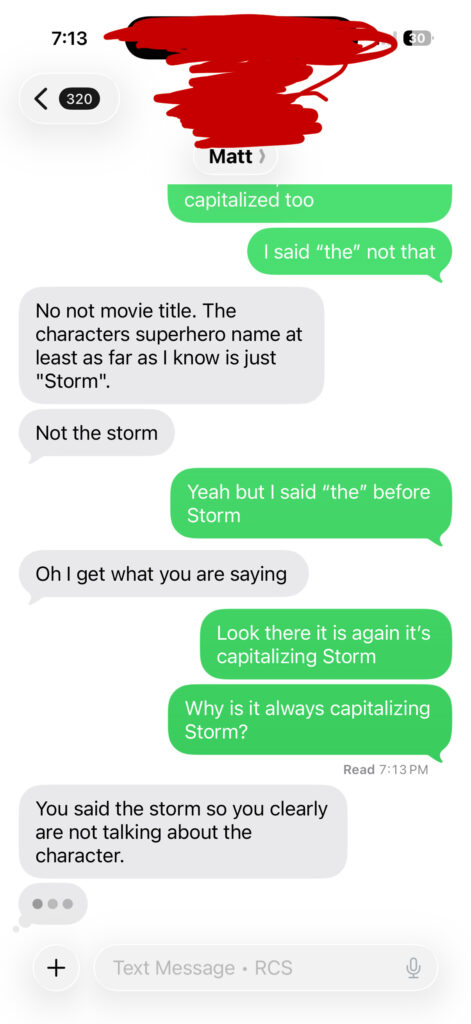
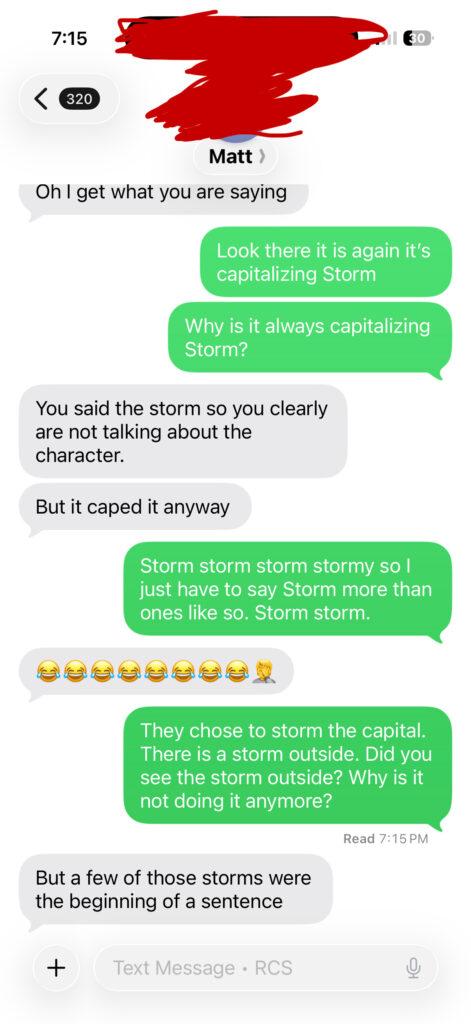
At the bottom of this post you can see a small sample of a problem that happens in every conversation. This is a minor one. At least Siri got the word right.
Did Siri’s Grammar Get Worse in iOS 26?
What does “general research” (searching) say. Many iPhone users have noticed something strange after updating to iOS 26 (now iOS 26.3.1): Siri dictation and typing sometimes feel less accurate than before. Words get changed unexpectedly, punctuation appears in odd places, and sentences can look awkward even when spoken clearly. While Siri itself hasn’t necessarily become “less intelligent,” several changes to Apple’s language systems may be causing the experience to feel worse.
Changes to Autocorrect and Language Processing
One of the biggest factors is the keyboard and autocorrect system, which shares underlying language models with Siri dictation. In recent iOS versions, Apple has moved toward AI-assisted predictive text that tries to interpret your intent rather than simply correcting spelling mistakes.
Users ask the following… Or in my case google “Why the fuck does siri” :
Replace correct words with incorrect ones
Changing words after typing is finished
Randomly capitalize words
Not capitalize names
Misspell English names (spells Indian names perfectly hint hint)
Change George to Jorge
Spell the name of the person your texting. Seriously, Greg with 2 G’s?
Rewrite sentences just before you hit the send button
- Write BBB when I hold the space bar to move the text curser/insertion point
Supposedly Siri Is in the Middle of an AI Transition
Apple said it’s in the process of rebuilding Siri around more advanced AI models. Raise your hand if you think this will go well… The current excuse it that this transition involves combining traditional speech recognition with newer language models designed to understand context better.
During this transition period, some features and improvements are still being refined. As a result, accuracy can sometimes fluctuate depending on the type of speech input or the complexity of the sentence. I hope that they either buy a good AI, keep renting or that after 3 years they will work something out, but Tim Cook would need to hand the reigns to a visionary software person (not hardware).
Why Siri Inserts Periods in Strange Places
Another common complaint is random punctuation, especially periods appearing where they don’t belong.
Siri automatically inserts punctuation by analyzing how you speak. The system looks for signals such as:
pauses in speech
changes in pitch
breathing patterns
sentence rhythm
If Siri detects a pause that seems long enough, it may assume the sentence has ended and insert a period. But conversational speech often includes pauses that don’t actually mark the end of a sentence, which can lead to awkward results.
For example, if you dictate:
“I was thinking maybe we could go tomorrow if it’s not raining.”
A slight pause might cause Siri to write:
“I was thinking maybe we could go tomorrow. If it’s not raining.”
Even though you intended one sentence, the system splits it into two.
Tips to Reduce Dictation Errors
A few simple habits can sometimes improve results when using Siri dictation:
Speak continuously instead of pausing mid-sentence
Use connecting words like “and” or “so” to avoid long pauses
Say punctuation out loud (for example, “comma” or “period”) when needed
Reset the keyboard dictionary if autocorrect becomes unreliable
While these steps don’t eliminate every issue, they can reduce some of the more frustrating errors.
Other Grammatical Problems Users Sometimes Notice
In addition to misplaced periods, Siri dictation may also produce some more “Why the fuck does siri” moments like:
Random capitalization in the middle of sentences
Missing commas where pauses clearly exist
Incorrect homophones (for example: “their,” “there,” and “they’re”)
Sentence fragments created by incorrect punctuation
Repeated words such as “the the” or “and and”
Incorrect verb tense when the system guesses context incorrectly
Dropped small words like “a,” “to,” or “the”
Unexpected word substitutions after dictation finishes processing
These issues usually stem from the system trying to predict meaning rather than simply transcribe speech, which can sometimes lead to results that look grammatically strange.